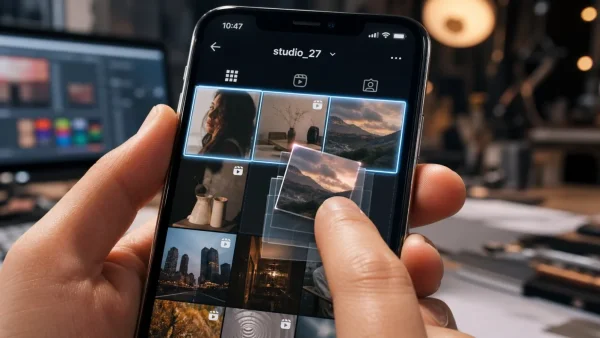
It is a power move for creators and the rest of us: at last, you can reorganise your grid without having to part with any of your posts. The Reorder Grid feature has been let out of the bag, and while not every account has it, you can start to put a new spin on your profile. Here is what you need to do.
Why this is a big deal
Up until now, if you wanted to spruce up your profile, you were stuck with deleting, archiving or pinning. Reorder Grid changes the rules. You can put your photos and videos where you want them and leave the rest as is.
Instagram is touting it as a matter of self-expression. 'Your grid, your way,’ they put it. In a way, it is a departure from the rigid, chronological feed of old in favour of something with a bit more personality.
And there is a side benefit to it. Put a post at the top and its timeline doesn’t get reset. The date is still there, and we won’t go and tell your followers you’ve been shuffling things about.
Rearranging your grid: a quick guide
You will see it as a new option on your profile. When the time comes to give your page a freshen-up, here is the way to do it:
– Go to your profile in the app
– Hold down on a post
– You’ll see ‘Reorder grid’ in the menu; hit that
– Simply drag and drop to your liking
– Then save and you are done
If you have been at this for a while, you can bring some of your older work to the fore without the hassle of a re-upload. Your first row can be what you want it to be, not just the most recent thing you put up.
Where are we with the rollout?
Some of you won’t be able to find it yet. We haven’t made a fuss about it, and the App Store listing is as plain as day with ‘bug fixes and performance improvements.’ So there is some head-scratching over when it will be available to you.
Our Creator account has put out a how-to, but because we are doing this in waves, not everyone has it. We are seeing our share of questions on where to look for it. For now, you might have to be patient.
A few housekeeping notes
Before you get to work, here is the fine print:
– The upload date is sacrosanct
– No one is going to be notified of a reshuffle
Good to know if you like to keep an eye on your history, and it gives you the room to curate as you see fit.
How we got here
Adam Mosseri was hinting at this kind of thing a year back, after hearing from users who wanted it. But it has been in the pipeline for longer than that. Back in 2022, an app researcher by the name of Alessandro Paluzzi found an ‘Edit Grid’ tucked in the code.
Now it is here, and you can build a profile around a theme or a season. Whether you are an artist with a series to show off or a business with a bestseller to highlight, you can make your feed look the part.
Haven’t seen it? Make sure your app is up to date and have another look. When it does show up, a more put-together grid is just a long-press away.