WhatsApp is slowly stopping its avatar feature on Android and iOS and this will be more noticeable than it seems at first. Soon you won’t be able to create or edit your avatar, and the options to do so are being taken out of settings, chat windows and your phone’s keyboard. Luckily, avatar stickers you’ve saved won’t vanish.
The changes are coming in stages, so different people will experience things differently, and a section of the feature might be there today but gone tomorrow.
What changes for users
WhatsApp is taking away access to avatars in several places. You won’t be able to use an avatar instead of your profile picture, nor will you be able to change how it looks. The quick way to add avatar stickers to your chats from your keyboard is also going.
However, your stickers that you’ve already used are safe. You’ll still find them in your “recently used stickers” section, and some might be in your favourites if you saved them, but you won’t be able to make new avatars or open the avatar screen within a chat.
Here is what to expect next as the rollout expands:
– No avatar creation or editing
– Avatar removed from profile screens
– Avatar option vanishes in settings
– No avatar entry on the keyboard
– Previously saved stickers remain usable
How to see if your account is next
You can see if your account has been changed by going to the avatar section in WhatsApp’s settings. Some people are now getting a message that says you can’t edit your avatar anymore and it will be removed from your profile soon. Others have already had the whole avatar section disappear.
If you want a quick status check, try this:
– Open WhatsApp settings and look for Avatar
– If visible, tap to see if an alert appears
– If missing, the feature has been removed
Rollout status and official word
WhatsApp hasn’t publicly said why they are stopping avatars or given a final removal date. Reports say the change is being done gradually and will continue over the next few weeks.
WABetaInfo shared pictures of messages inside the app that confirm some users can no longer edit their avatars. Because it’s being rolled out in stages, many won’t realise the feature is gone until they try to use it.
A feature with a short, iterative journey
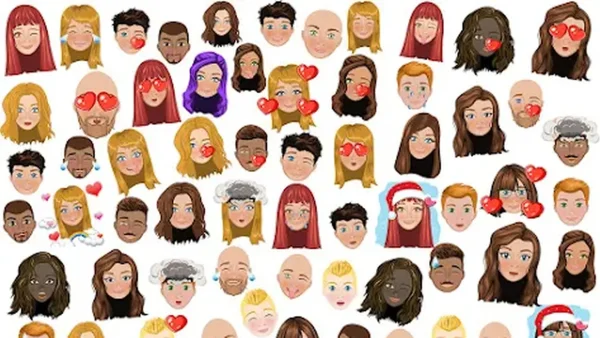
Avatars were originally a fun way to create a digital version of yourself, choosing your face, hair and clothes. WhatsApp let you select a colour for the background and even add movement to make your avatar more lively in chats.
Once you’d made one, it would show next to your profile picture on the chat details screen, and WhatsApp would have a little flipping animation to switch between the photo and the avatar. Over time, Meta (WhatsApp’s owner) improved how they looked and gave you more options to customise them and make them more expressive.
WhatsApp then added stickers made from your avatar, aiming to combine your identity with quick ways to respond in conversations. Despite all these changes, though, most people didn’t really use the feature. Now, it’s being removed from profiles, settings and the keyboard on both Android and iOS.
Why this matters now
If you used avatars to show a playful side of yourself or to send personal stickers, you’ll have fewer options for being creative within WhatsApp. You can still see older avatar stickers in your recent or favourites, so past chats aren’t affected, but you won’t be able to change or get a new avatar from now on.
For the rest of us, the change will make the app a little less busy without changing regular messaging. Essentially, avatars are going away, and the only ones that will remain are the ones you already have. Check your settings to find out when the feature disappears for you.